last updated on July 27, 2026
Introduction
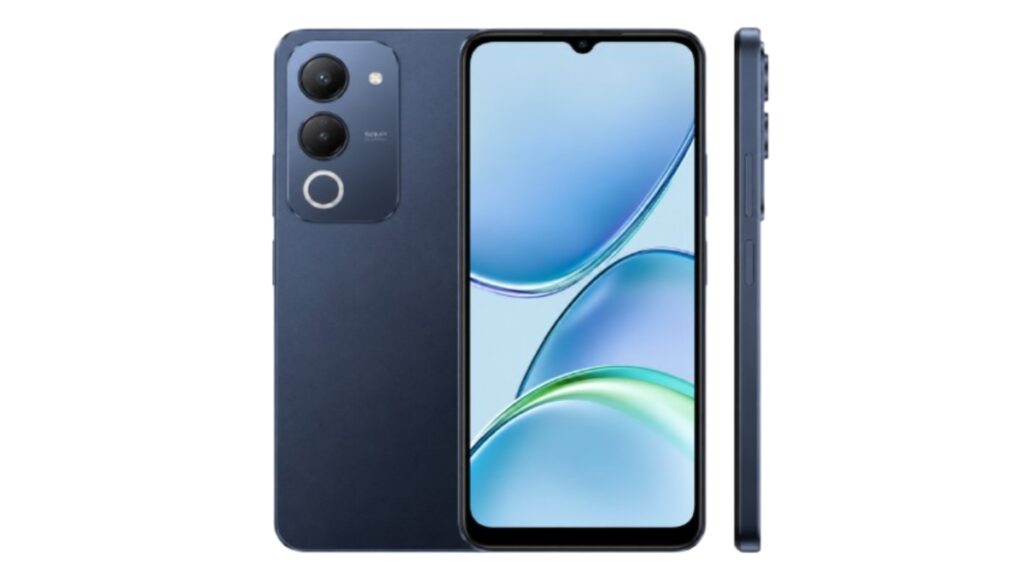
The Vivo Y11d is one of the most popular budget phones in Pakistan in 2026. People like it for its big battery, clean design, and affordable price. But many buyers have one question before buying. Where is the fingerprint sensor on Vivo Y11d? Is it under the screen or on the side?
If you are also confused, this article will clear everything. We will talk about the exact location, how to set it up, speed, pros, cons, and user feedback. The short answer is: The Vivo Y11d has a side-mounted fingerprint sensor built into the power button. It does not have an in-display fingerprint.
Vivo Y11d Price and Variants in Pakistan 2026
The fingerprint feature is the same in all variants. The only difference is RAM and storage. Here is a table to help you decide:
| Variant | Price in Pakistan 2026 | What It Means For You |
|---|---|---|
| 4GB RAM + 128GB Storage | Rs. 52,999 PKR | Best for students and basic users. Good for WhatsApp, YouTube, and Facebook. Comes with fast side fingerprint. |
Note: Prices can change based on market and location. Always check with local shops before buying. For price reference you can also visit WhatMobile website.
Vivo Y11d Fingerprint Location: Confirmed
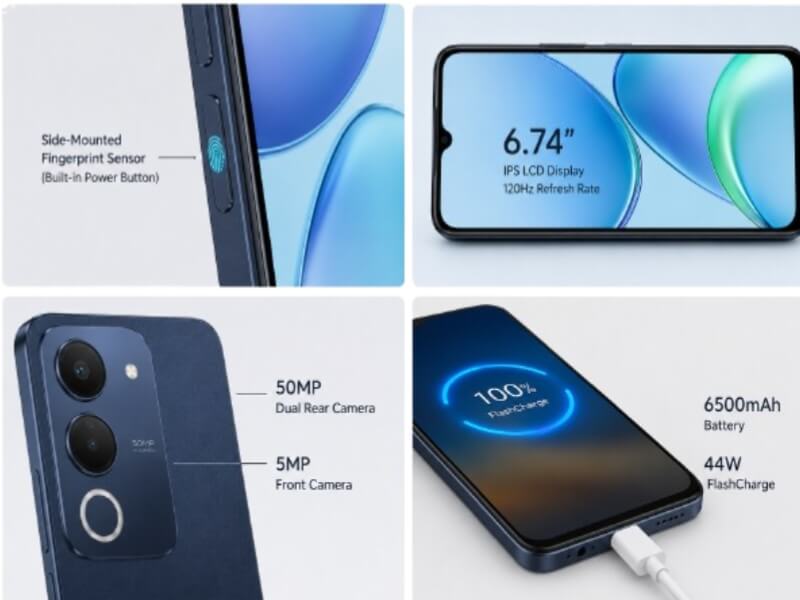
According to the official Vivo website and spec sheet, the Vivo Y11d does not come with an in-display fingerprint scanner. Vivo has placed the fingerprint sensor on the side of the phone.
You can find it on the right side. There are two buttons. The top ones are volume buttons. Below them is the power button. This power button also works as the fingerprint scanner.
When you press the power button, your fingerprint is scanned at the same time. This design is very common in budget phones in 2026. It helps to keep the price low and makes unlocking faster.
Why Vivo Used Side Fingerprint in Y11d
There are two main reasons why Vivo chose a side fingerprint instead of in-display.
First reason – Screen type: The Vivo Y11d uses a 6.74 inch IPS LCD display with 120Hz refresh rate. In-display fingerprint sensors work best with AMOLED screens. IPS LCD screens do not support this technology well.
Second reason – Price: The price of Y11d in Pakistan is Rs. 52,999 PKR. If Vivo added an in-display fingerprint, the cost would go up. A side fingerprint is cheaper to make. It is also often faster than cheap in-display sensors found in this price range.
How to Set Up Fingerprint on Vivo Y11d
Setting up the fingerprint is very easy. It takes only 1 to 2 minutes. Follow these steps:
- Open Settings on your Vivo Y11d
- Go to Security and Privacy
- Tap on Fingerprint
- Set a PIN, Pattern or Password first for backup security
- Place your finger on the power button and lift it again and again
- Repeat until the progress reaches 100%
- You can add up to 5 fingerprints
Pro Tip: For better accuracy, register the same finger two times. One time normally and one time at a slight angle.
Fingerprint Speed and Accuracy
Based on official data and user reviews, the side fingerprint on Vivo Y11d is very fast. The average unlock time is around 0.3 to 0.5 seconds.
In normal conditions, it works 9 out of 10 times on the first try. If your hands are wet, dirty, or oily, it may need a second try. This is normal for all capacitive fingerprint sensors.
Compared to face unlock, fingerprint is more secure. Face unlock can fail in dark rooms or with a mask. But fingerprint works in all conditions.
Vivo Y11d Full Specs Overview 2026
Here are the complete specs of Vivo Y11d based on official data:
| Category | Details |
|---|---|
| OS | Android 16 |
| Display | 6.74 Inches IPS LCD, 120Hz, 720×1600 Resolution |
| Processor | Unisoc T7225 Octa Core |
| RAM & Storage | 4GB RAM + 128GB Storage, 4GB Extended RAM |
| Camera | 50MP Dual Rear Camera + 5MP Front Camera |
| Battery | 6500 mAh with 44W Fast Charging |
| Sensors | Accelerometer, Compass, Fingerprint side mounted, Gyro, Proximity |
| Price in Pakistan | Rs. 52,999 PKR |
As you can see in the specs, it clearly says “Fingerprint side mounted”. So there is no confusion.
Pros and Cons of Side Fingerprint on Vivo Y11d
Pros
- Super Fast: Unlocks in less than one second. Faster than many expensive in-display sensors.
- Easy Access: Your thumb naturally goes to the power button when you hold the phone.
- Works on Table: You do not need to pick up the phone to unlock it.
- No Screen Problem: Screen protectors and tempered glass do not affect the sensor.
- Battery Saving: The screen does not need to turn on to scan your finger.
Cons
- Left Hand Use: Left-handed people may need to adjust their grip at first.
- Needs Cleaning: The power button can collect dust and oil. Clean it once a week.
- Small Scanning Area: You need to place your finger in the correct spot on the button.
- Less Premium Look: In-display looks more modern, but it costs more.
Public Reviews and Global Feedback
In Pakistan, users on YouTube, TikTok, and Facebook tech groups have given positive feedback about the side fingerprint. Most people say it is fast and reliable for the price.
On a global level, budget phone users also prefer side fingerprint. On Reddit and X, many people say that cheap in-display sensors in phones under $200 are slow and frustrating. Side sensors are more reliable in this price range.
The only common complaint is that the scanning area is small. So during setup, make sure to cover all parts of your finger.
Common Problems and Solutions
Problem 1: Fingerprint not working
Fix: Clean the power button with a dry cloth. Go to settings and delete old fingerprints. Then add new ones.
Problem 2: Unlock is slow
Fix: Make sure your finger is dry. Register the same finger again from two different angles. You can also restart the phone.
Problem 3: Sensor stopped working
Fix: First restart your phone. If it still does not work, visit the nearest Vivo service center. It is covered under warranty.
FAQ – Frequently Asked Questions
Does Vivo Y11d have in-display fingerprint?
No. Vivo Y11d does not have an in-display fingerprint. It has a side-mounted fingerprint sensor on the power button.
How many fingerprints can I add?
You can add up to 5 fingerprints on Vivo Y11d.
Is side fingerprint secure?
Yes. Side fingerprint is as secure as in-display. Your fingerprint data is stored safely on the phone and is not uploaded to any server.
Can I use fingerprint with a mobile cover?
Yes. Just make sure your cover has a proper cutout for the power button. Thick covers can sometimes block it.
Does wet finger work on Y11d fingerprint?
No. This is a capacitive sensor. It works best with dry and clean fingers. Wet fingers may cause errors.
Is side fingerprint better than face unlock?
For security, yes. Fingerprint is safer. For convenience in good light, face unlock is faster. The Y11d gives you both options.
Will a software update add in-display fingerprint?
No. Hardware cannot be changed with software updates. The fingerprint will always stay on the side power button.
Final Verdict
The Vivo Y11d is a great budget phones for 2026. Its side-mounted fingerprint is one of its strongest features. It is fast, reliable, and easy to use in daily life.
Even though it is not in-display, you will not feel like you are missing anything. In fact, many users prefer side fingerprint because it is more practical and faster.
If you are buying Y11d for study, office work, social media, or light gaming, the fingerprint will not disappoint you. Just set it up properly and enjoy fast unlocking.
Disclaimer
This article is for information purposes only. All details like price, specs, and features are based on public data and user reviews as of 2026. Prices and availability may vary by city and store. We are not affiliated with Vivo. Please confirm details from an authorized Vivo dealer before buying. All brand names and images belong to their respective owners.
Pingback: Vivo Y11 Review: Is It Worth Buying in 2026? - mobvanta.com